


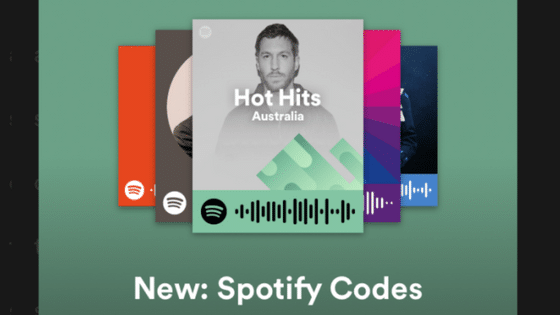
Spotify Codes give artists a fast way to connect fans with a specific song, album, playlist, or artist profile. Instead of asking someone to search for your name and hope they find the right page, you can give them a scannable Code that opens your content directly in the Spotify app.
They can be especially useful when promoting music through printed materials, social content, live events, networking, and other situations where a normal clickable link may not be practical.
Key Takeaways
- Spotify Codes open content directly in Spotify, including songs, albums, playlists, and artist profiles.
- Fans must use Spotify’s mobile scanner to scan a Spotify Code.
- Use the official generator for high-resolution files that will be printed on flyers, posters, or event materials.
- Spotify Codes do not provide scan analytics, so use a tracked link or standard QR code when measurement is the priority.
What Is a Spotify Code?
A Spotify Code is a scannable graphic that opens a specific piece of content inside Spotify. Artists can create Codes for songs, albums, playlists, and artist profiles, giving fans a direct path to the content they want to promote.
A Spotify Code looks similar to a QR code, but it is not a standard QR code. It can only be read by the scanner inside the Spotify mobile app. A phone’s regular camera app or a typical QR code reader will not recognize it.
This makes Spotify Codes best suited for campaigns where the intended action is clear: open Spotify and listen, follow, save, or explore.
How to Create a Spotify Code
There are two main ways to create a Spotify Code. You can quickly capture one from the Spotify mobile app or download a higher-resolution version from Spotify’s official generator.
Create a Spotify Code in the Mobile App
- Open the Spotify app on your phone or tablet.
- Go to the song, album, playlist, or artist profile you want to share.
- Tap the three-dot menu next to the content.
- Select Show Spotify Code near the bottom of the sharing options.
- Take a screenshot or save the image so you can share it with your audience.
This option works well for quick social posts, messages, or informal sharing. You can review Spotify’s official sharing instructions for the latest app steps.
Download a High-Resolution Spotify Code
If you plan to print your Code, use it in professional artwork, or resize it for a campaign, download a high-resolution file instead of relying on a phone screenshot.
- Open the song, album, playlist, or artist profile in the Spotify desktop app.
- Right-click the content or select its three-dot menu, then choose Share.
- Hold the Alt key on Windows or the Option key on Mac to reveal the option to copy the Spotify URI.
- Visit the official Spotify Codes generator.
- Paste the Spotify URI into the generator.
- Select the available color, size, and file options that fit your campaign.
- Download the finished Code and test it before publishing or printing it.
A high-resolution file will stay clearer when it is placed inside a poster, flyer, release card, presentation, or other designed material.
How to Scan a Spotify Code
Spotify Codes must be scanned through the Spotify mobile app. The scanner is available on phones and tablets.
- Open the Spotify app.
- Tap Search.
- Tap the search bar.
- Tap the camera icon.
- Select Scan and allow camera access if requested.
- Point the camera at the Spotify Code.
Spotify should then open the song, album, playlist, or profile connected to the Code.
Because some fans may not recognize the graphic, include a clear instruction such as “Open Spotify, tap Search, and scan” next to the Code.
Best Ways to Use Spotify Codes for Music Promotion
A Spotify Code is most effective when it removes friction at a specific point in your fan journey. Do not place the same Code everywhere without considering what you want the listener to do next.
Social Media and Digital Content
Add a Spotify Code to release graphics, Instagram carousels, Stories, digital press kits, newsletters, or fan community posts. Pair it with a direct Spotify link whenever the platform supports clickable links.
The Code gives fans another way to reach the release, while the clickable link helps people who are already viewing the post on their phone. Include a brief scanning instruction instead of assuming everyone already knows how Spotify Codes work.
Printed Marketing Materials
Spotify Codes can connect offline promotion to online listening. Consider placing one on:
- Release flyers
- Posters and event signage
- Business cards or networking cards
- Table displays
- Promotional postcards
- Festival or conference materials
- Media and influencer mailers
Choose the destination based on the campaign. A single-release flyer should usually direct listeners to the song or album, while a general artist card may work better when it opens your artist profile.
Playlists and Release Campaigns
A Code can send fans to an artist-curated playlist that includes your music alongside complementary tracks. This can provide more context around your sound and give listeners a reason to return after hearing one release.
You can also create separate Codes for different campaign moments. For example, release-day signage might open the new single, while a post-show card might open your artist profile or a playlist featuring the night’s set.
Shows and In-Person Networking
Spotify Codes are useful when meeting fans, promoters, managers, collaborators, or members of the media. Instead of spelling your artist name or hoping the other person finds the correct profile, display a Code on your phone or provide a small printed card.
This works best when the interaction includes context. Tell the person what the Code opens and why that specific song, album, or playlist is worth hearing.
Spotify Code Design and Printing Best Practices
Spotify Codes need to remain clear and recognizable to the in-app scanner. Follow these guidelines when adding one to campaign artwork:
- Keep the complete rectangular Code intact. Do not crop, stretch, tilt, or alter its individual bars.
- Use strong contrast. The bars must be easy to distinguish from the Code’s background.
- Add a clear call to action. Use wording such as “Scan on Spotify” or “Open Spotify and scan.”
- Size it for the viewing distance. A Code on a handheld flyer can be smaller than one displayed on event signage.
- Use a high-resolution file. Start with a large version and reduce it rather than enlarging a small screenshot.
- Test the final design. Scan an actual-size proof before ordering printed materials.
- Keep it away from edges and visual clutter. Give the Code enough space to remain distinct from the surrounding design.
Spotify notes that its in-app scanner does not zoom, so a Code that is too small or too far away may be difficult to scan. Review the official Spotify Codes best practices before finalizing a large print campaign.
Can You Track Spotify Code Scans?
Spotify does not provide analytics showing how many times a Spotify Code has been scanned. The official generator also does not support unique tracking parameters or attribution.
A Spotify Code must open Spotify content. It cannot direct fans to an external website, smart link, ticket page, pre-save landing page, or email signup form.
If campaign measurement or multiple streaming destinations are important, consider using a standard QR code that points to a tracked smart link. You can still place a Spotify Code nearby when you want to give Spotify listeners a direct option.
The right choice depends on the goal:
- Use a Spotify Code when you want the fastest path to a specific Spotify destination.
- Use a standard QR code when you need analytics, retargeting, multiple platforms, or an external landing page.
How Spotify Codes Fit Into Your Release Strategy
A Spotify Code is a helpful access point, but it should not be the entire campaign. The Code gets a listener to your music. Your profile, artwork, release strategy, and follow-up content determine what happens after they arrive.
Before driving traffic, take time to optimize your Spotify for Artists profile. Make sure your images, biography, Artist’s Pick, release information, and links give new listeners a clear reason to keep exploring.
You can then support the Code with social content, playlist pitching, email or SMS promotion, advertising, and additional music promotion ideas.
For a broader look at profile optimization, analytics, playlisting, and Spotify’s artist tools, explore Symphonic’s complete Spotify strategy.
Ready to Get Your Music on Spotify?
Spotify Codes can help fans find a release once it is available, but first you need to deliver your music to the platform correctly. Symphonic helps independent artists distribute their music to Spotify and more than 200 digital service providers.
Frequently Asked Questions About Spotify Codes
What can I create a Spotify Code for?
You can create Spotify Codes for songs, albums, playlists, artist profiles, and other eligible content with a Spotify URI. Choose the destination that best matches the action you want fans to take.
Are Spotify Codes the same as QR codes?
No. Spotify Codes are QR-like graphics, but they can only be scanned through the scanner inside the Spotify mobile app. Standard QR codes can be scanned by most phone cameras and can open websites or tracked landing pages.
Can I scan a Spotify Code on a desktop computer?
No. Spotify’s Code scanner is designed for the mobile and tablet apps. Desktop users can still open a normal Spotify URL or URI.
Why is my Spotify Code not scanning?
The Code may be too small, blurry, distorted, low contrast, cropped, or surrounded by too much visual clutter. Download a high-resolution version, keep the full rectangle intact, and test the Code at its final display size.
Can I track how many people scan my Spotify Code?
No. Spotify does not currently provide scan counts, attribution, or unique tracking for Spotify Codes. Use a standard QR code connected to a tracked landing page when analytics are required.
Can a Spotify Code open a website or pre-save page?
No. Spotify Codes are designed to open content within Spotify. Use a standard QR code when you need to direct fans to a website, pre-save campaign, ticket page, store, or multi-platform smart link.
Should I use a Spotify Code or a regular link on social media?
Use both when possible. A clickable link is usually easier for someone already using their phone, while a Spotify Code can work well in graphics, screenshots, printed materials, and cross-device situations.


One Comment
Comments are closed.