

Amazon Music for Artists: How to Use It to Grow Your Fanbase
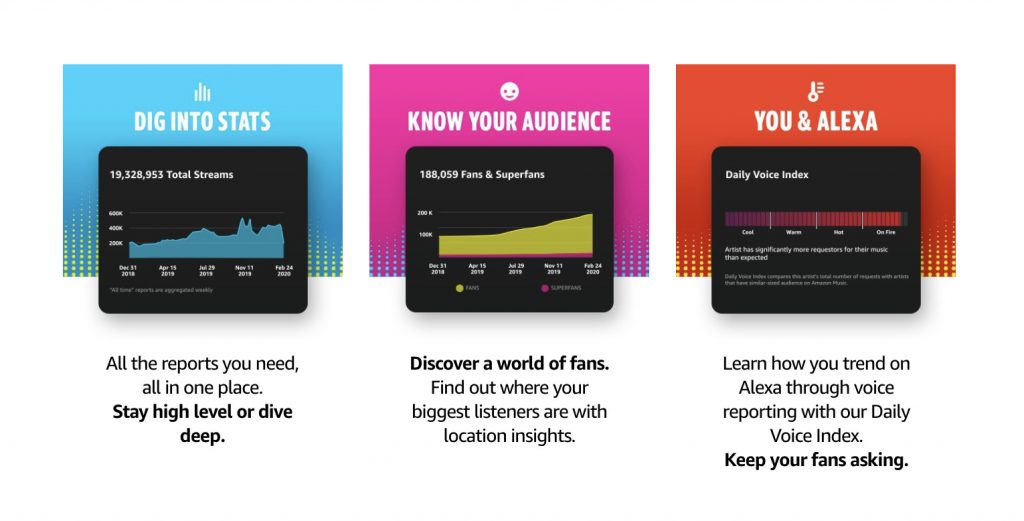
Amazon Music for Artists gives musicians, managers, and teams a clearer view of how music is performing across Amazon Music. It is more than an analytics dashboard. Artists can use it to claim their profile, understand streaming trends, see how fans ask Alexa for their music, pitch new releases, update artist branding, create promotional assets, and connect with fans before and after release day.
Here is how to use Amazon Music for Artists to make better release, marketing, and fan engagement decisions.
What Is Amazon Music for Artists?
Amazon Music for Artists is Amazon Music’s artist platform for managing your presence and tracking your performance on Amazon Music. Artists and their teams can access it on mobile or on the web, then use it to review streaming insights, understand listener behavior, update parts of their artist profile, pitch new music, and promote key career moments.
For independent artists, the biggest value is control. Instead of guessing how fans are discovering your music, you can look at real data and use it to make smarter decisions around release timing, social promotion, touring markets, playlist strategy, and fan communication.
Key Takeaways
- Claim your profile first: This unlocks access to your Amazon Music data, tools, and profile controls.
- Use your stats before making marketing decisions: Streams, location insights, playlists, and Alexa activity can help you understand what is working.
- Pitch new releases early: Eligible releases can be submitted for Amazon Music programming and playlist consideration.
- Keep your profile current: Updated images, branding, and social promotion help fans recognize you across platforms.
- Turn listeners into followers: Encourage fans to follow you on Amazon Music so they can be notified when new music drops.
What You Can Do Inside Amazon Music for Artists
Amazon Music for Artists can help you answer the questions every artist asks after a release: Who is listening? Where are they located? How are they finding the music? Which playlists or stations are helping? What should we do next?
Track streams, listeners, and location data
The analytics inside Amazon Music for Artists help you see how your songs, albums, and catalog are performing. Use this data to spot patterns like:
- Which tracks are gaining momentum
- Where listeners are located
- How performance changes after a campaign, playlist add, tour date, or social post
- Which songs may deserve more content, ads, or pitching support
This is especially useful when planning your next campaign. If one city is reacting strongly to your release, that may influence tour routing, local press outreach, social targeting, or merch promotion.
See how fans use Alexa to play your music
One of the biggest differences between Amazon Music for Artists and other artist platforms is Alexa data. Because so many fans use voice commands to play music, Amazon gives artists insight into how their music is being requested through Alexa.
The Daily Voice Index helps show how your music is trending through voice requests. Fans may ask Alexa to play music by artist name, song title, album, or lyrics. For artists, this makes metadata and fan education even more important. Your artist name, song titles, featured artist credits, and release information should be clean, consistent, and easy to say out loud.
New to voice strategy? Check out how to start developing a voice strategy for your music.
Pitch new releases for playlist and programming consideration
Amazon Music for Artists gives eligible artists and teams a way to pitch new music for programming and playlist consideration. Once your release has been delivered to Amazon Music, eligible music can appear under New Releases inside Profile & Tools.
When pitching, give Amazon Music the context a curator needs. Do not just list the genre. Explain the mood, audience, story, marketing plan, collaborator details, hometown support, press, sync activity, tour plans, and any other signals that show who the release is for.
Strong pitch details can help your music land in front of better matched listeners. That matters because playlisting is not only about getting more streams. It is about reaching the people most likely to become real fans.
Update your artist profile
Your Amazon Music artist profile is part of how fans, curators, and potential new listeners experience your brand. Through Amazon Music for Artists, artists and approved team members can update profile imagery and keep visuals aligned with the current release campaign.
Before every release, make sure your profile looks current. Update your image, check that your music is mapped to the correct profile, and make sure the visual identity matches the song or project you are promoting.
For a broader walkthrough, read our guide on how to claim your artist profile across major music platforms.
Promote releases with Hype Cards and followers
Amazon Music for Artists also includes promotional tools that help you share important moments with fans. With Hype Deck, artists can create custom, shareable Hype Cards for milestones like a new release, playlist placement, or catalog moment.
Followers are another important part of your Amazon Music strategy. Encourage fans to follow you on Amazon Music so they can be notified when you release new music. You can promote this on social media, email, your website, livestreams, and at shows.
Connect merch opportunities
Amazon Music for Artists now connects more closely with merch opportunities across Amazon. Depending on eligibility and setup, artists can explore merch tools, print-on-demand options, and ways to connect merch with Amazon Music and fan discovery.
This can be especially valuable if you already have an active fanbase, touring schedule, or release campaign. When listeners are already engaging with your music, merch gives them another way to support you.
How to Claim Your Amazon Music Artist Profile
Before you can use these tools, you need access to your artist profile. The basic process is simple:
- Go to Amazon Music for Artists or open the Amazon Music for Artists app.
- Sign in with an Amazon account.
- Search for your artist name and select the correct profile.
- Tap or select Claim.
- Fill out the requested information to verify your relationship to the artist.
- Connect eligible distributor access or official social accounts when available.
- Submit the request and wait for approval.
If you manage a label or distributor catalog, do not claim artist profiles one by one unless Amazon instructs you to do so. Amazon has a separate access path for labels and distributors.
If your music is not on Amazon Music yet, you will need to work with a distributor first. Here is how to get your music on Amazon Music.
How to Use Amazon Music for Artists Before and After a Release
The best time to use Amazon Music for Artists is not only after a song comes out. Use it before, during, and after release day.
Before release day
- Confirm your release has been delivered to Amazon Music.
- Check that the artist name, featured artists, song titles, artwork, and metadata are correct.
- Claim or update your artist profile.
- Upload current artist imagery.
- Pitch eligible new music through Amazon Music for Artists.
- Create social content asking fans to follow you on Amazon Music.
- Prepare Hype Cards or other promotional assets for release week.
During release week
- Share your Amazon Music link across social channels, email, and your website.
- Remind fans they can ask Alexa to play your song.
- Post Hype Cards for major moments, including release day or playlist adds.
- Watch early data to see which markets and songs are reacting first.
- Encourage saves, shares, follows, and playlist adds.
After release day
- Review your streaming and listener trends.
- Look for cities or countries where the release is overperforming.
- Check Alexa request trends and use that insight in your voice strategy.
- Use playlist and station data to understand discovery sources.
- Keep promoting the strongest-performing songs with short-form content, live clips, lyric posts, behind-the-scenes stories, and fan callouts.
Social Media Best Practices for Amazon Music
Social media can help push more fans to your Amazon Music profile, but the goal should be specific. Do not only say “stream my song.” Tell fans what action helps you most.
- Ask fans to follow your artist profile on Amazon Music.
- Share direct links to songs, albums, and your artist page.
- Tell fans they can ask Alexa to play your song by name.
- Post Hype Cards when you release music, hit a milestone, or land a playlist.
- Tag @AmazonMusic when relevant.
- Use clear captions that explain why the release matters and what fans should do next.
For example, instead of only posting “Out now,” try: “My new single is out now on Amazon Music. Follow my artist profile and ask Alexa to play [song title] by [artist name].”
Why Amazon Music for Artists Matters for Independent Artists
Independent artists need more than upload access. You need feedback that helps you understand what is connecting. Amazon Music for Artists gives you another layer of insight into your audience, especially when it comes to voice discovery, playlist performance, location data, and listener engagement.
Used consistently, these tools can help you:
- Make better release decisions
- Understand which songs deserve more promotion
- Find markets where fans are already listening
- Improve your pitch strategy
- Build stronger fan habits around follows and voice requests
- Keep your profile aligned with your current brand
Amazon Music for Artists FAQ
Is Amazon Music for Artists free?
Yes, Amazon Music for Artists is a free tool for artists and approved team members with music available on Amazon Music.
Do I need my music on Amazon Music before I can claim my profile?
Yes. Your music needs to be delivered to Amazon Music before you can fully claim and manage your artist profile. If you have not distributed your music yet, work with a distributor first.
Can I pitch my music to Amazon Music playlists?
Eligible new releases can be pitched inside Amazon Music for Artists after they are delivered to Amazon Music. For the best results, include strong details about the song, genre, mood, audience, marketing plan, and release context.
What is the Daily Voice Index?
The Daily Voice Index helps artists understand how their music is being requested through Alexa compared with artists of a similar audience size. It can include requests by artist name, song, album, or lyrics.
Can managers and labels access Amazon Music for Artists?
Yes. Artists, managers, labels, and distributors can access Amazon Music for Artists, but access levels and team setup depend on the role. Owners and Admins can manage more settings, while Viewers can access data without taking action.
How can I get my music on Amazon Music?
You need to distribute your music through a music distributor. Symphonic can help deliver your music to Amazon Music and other major digital service providers while giving you tools to manage royalties, analytics, and releases.
Final Thoughts
Amazon Music for Artists is one of the most useful tools artists have for understanding how fans interact with their music on Amazon Music. Claim your profile, watch your data, keep your visuals fresh, pitch eligible releases, encourage fans to follow you, and use Alexa insights to make your music easier to discover.
Need to get your music onto Amazon Music first? Symphonic Starter helps independent artists distribute music to major digital service providers, manage royalties, and keep building with tools that support long-term growth.